





A Powerful, All-in-one Telegram Signal Copier
One compact solution can delight your forex journey and fuel your profit.
AI CopyGenius
Allows you to automatically copy any format of trading signal—no setup or configuration needed. Just enable it, and the AI will intelligently detect entry, SL, and TP from any message format, saving time and removing manual work
AI Image Recognition
Vision AI powered Image Recognition enhances trade execution by automatically detecting trading signals from images. It uses advanced image processing to identify buy/sell, entryprice, stop-loss, and take-profit levels. Once recognized, the data is instantly converted into executable trades by the TSC, reducing manual input errors and improving efficiency.
All Orders
Copy all types of orders mentioned with different prices from one signal message.
All Price (Prefer Entry)
No more picking just one entry price from the entry range! Now your trades can trigger with both entry prices — maximizing opportunities For example: A signal like XAUUSD BUY 3000-3010 and if you select ALL PRICE option, It will open trades with 3000 and 3010 entry price.
AI Config Generator
Automatically set and define your signal keywords with advanced AI for effortless signal copying. Just copy your provider’s signals, paste them into the AI CONFIG, and instantly generate an import-friendly file for your Copier Config.
Any Format & Language
Easily interpret signals in any format or language, making it simple to use with a wide variety of signal providers.
Adjust B/E pips when TP hits
Automatically adjust trades to breakeven after TP is hit, helping minimize broker commission impact.
Any Groups or Channels
Trade from private/public channels & groups, expanding signal opportunities for better results.
Any Order Type
Adapt to various trading strategies with the flexibility to execute market, limit, stop, and other order types.
Any Type of Pair
Access wide range of assets to diversify your trading portfolio.
Auto Spread in SL/TP
Automatically adjust your stop loss and take profit levels to include your broker’s spread, preserving accurate risk and reward targets for every incoming signal.
B/E & Close Management
Set breakeven pips to save on commission and ensure accurate SL. Customize lot percentages for partial and half-close updates from providers, optimizing trade closures.
Channel Updates
Easily manage trades with updates like setting SL/TP, moving SL to entry, closing half/full/partial positions, and reentering trades.
Channel Search
Quickly locate channels by name using our in-app search bar, ensuring faster access and easier navigation.
Close Old Trade by Opposite Signal
If a new opposite signal (e.g., Sell) arrives for the same pair from the same channel, your current trade (e.g., Buy) will auto-close.
Close TPS Separately
Close each take-profit level independently, helping you to lock in partial profits at different stages of a single trade.
Comment
The Comment feature allows traders using Expert Advisors (EAs) to conceal signal-provider information in trade comments, ensuring full compliance with prop firm guidelines. While most prop firms permit the use of EAs, they typically restrict visible third-party signals. By hiding the provider’s details, the Hidden Comment feature helps traders maintain strategy privacy, avoid unnecessary scrutiny, and confidently trade within prop firm rules.
Create Multiple TPs
Enforce multiple take-profit levels on any trade, even if your signal provider doesn’t specify them, ensuring flexible and personalized profit strategies
Custom Strategies
Tailor unique strategies for each channel or group, optimizing performance and personalizing your trading experience.
Customize Entry/SL/TP
Customize entry, SL, and TP by pips to avoid detection and bans, ensuring unique trade parameters.
Customize SL-TP Prices
TSC allows you to set stop-loss and take-profit levels for each trade or apply them universally, offering flexible, personalized control.
Delay Function
Introduces a customizable delay to avoid detection, ensuring trading appears independent, enhancing discretion in proprietary trading environments.
Divide Risk Equally
Evenly split your risk across multiple trades, ensuring balanced and consistent risk management.
Dynamic Lot Size %
Set your preferred risk percentage for TP1-TP5 for dynamic lot size calculation, ensuring optimized risk management.
Dynamic Lot Size $
Define a specific dollar amount to risk on each trade, ensuring consistent risk management.
Edit Updates
Automatically adjusts orders if the signal provider edits the message, ensuring up-to-date trade information.
Exclude Pair
Prevent trades on undesired trade pairs by excluding them, ensuring your trades remains focused and aligned with your preferences.
Fixed Lot Size
Set fixed lot sizes for TP1-TP5 to suit your strategy. you can also ignore specific TPs, giving you tailored control over your trades for improved profit potential.
Force Market Execution
Enables the option to always execute trades at the current market price, even if the signal provider price doesn't match the market price.
Ignore Any TP You Want
Easily skip any unwanted take-profit levels and maintain full control over your trades.
Ignore Trades
Easily filter out trade signals that do not include a Stop Loss (SL) or Take Profit (TP) level by enabling this option.
Move SL After TP Hit (No Trailing)
When TP1 is hit, all remaining SLs (TP2-TP5) will shift to entry automatically — no more trailing 🚀
Move SL After X Money Profit
Set your SL to auto-move to entry once you hit your chosen $ profit target.
Move SL After X RR Profit
Prefer RR-based logic? Move SL to entry once your trade reaches your preferred Risk-Reward ratio 🎯 👉For example: You want to move your SL to entry
Multi-Account Management
Effortlessly manage multiple licensed trading accounts from one place. Add or remove accounts, assign specific channels to each, and keep everything managed for a hassle-free multi-account experience.
Only Close Half After X Profits or TP Hit
Auto-close 50% of your position when your set Profit (Pips/Money/RR) or TP is achieved.
Optimized SL
Select from "Move SL to Entry" or "Move SL & Close Half" to control risk. Adjust settings to auto-move SL and close half after reaching desired pips.
Pending Orders Deletion
Add Specific keywords according to your signal provider to delete pending orders.
Pips Tolerance
Adjust for signal provider's price discrepancies by setting pips tolerance, preventing pending orders from market price mismatches.
Prefer Entry Price
Select your preferred entry price from the available options (first or second price if the signal includes two entry prices).
Read Forwarded
Avoids executing trades from unwanted forwarded messages that mention pair names or directions.
Remove SL When Needed
Easily remove your stop loss by replying “remove” to the signal, offering flexible real-time risk management.
Reverse Signal & SL/TP
Reverses trade direction, setting SL and TP based on original pip distances, maintaining strategic risk/reward ratios for reversed positions.
Risk Calculation on Preferred Balance
Enter your custom account balance — risk will be calculated based on that amount for precise position sizing.
Selective Symbol
Choose specific pairs to trade (e.g. XAUUSD, NAS100) or exclude unwanted pairs for a customized trading experience.
Skip Any Command
Easily skip unwanted signals by configuring keywords to ignore, preventing unnecessary trade commands and keeping your account safe.
SL/TP Override Mode
Customize your Stop Loss (SL) and Take Profit (TP) to suit your preferences and override those provided by your signal provider, ensuring optimal risk management.
SL/TP RR Mode
Multiplies the signal’s SL/TP pips with your preset Risk: Reward ratio to place calculated price levels.
SL and TP in Pips
Automatically converts provided SL and TP pip in the signal into exact price, ensuring precise execution.
Smart Profit Lock
Set your preferred percentage to close a portion of TP2 and TP3 positions after TP1 hits, ensuring partial profits are locked in.
Special Risk for Special Pairs
Define unique lot sizes or risk percentages for specific trading pairs, separate from your general settings, for precise control over your trades.
Symbols Mapping
This feature enables you to customize your trading by mapping pairs to the correct symbols, ensuring accuracy and preventing errors in execution.
Time Filter
Trade only during your preferred days and times—fully automated with the Time Filter feature.
Trade Filter Customization
Manage open orders and multi-trades with options like "Not Allowed," "Hedge Only," or "Allowed." Choose "All Time" or "Today" for same pair checks to avoid duplicates, optimizing your strategy.
Trade Layering
Split a single trade into multiple layers, optimizing entries, managing risk, and maximizing profit potential.
Trailing SL/TP
Integrates trailing stop with adjustable start, step, and distance, plus dynamic TP adjustment to optimize profit capture as market evolves.
Trailing Stop TP
Activate Trailing Stop for TPs and auto-adjust SL: Move SL of TP2 & TP3 to TP1 entry price when TP1 hits, and move TP3 SL to TP1 when TP2 hits, locking in profits and securing gains.
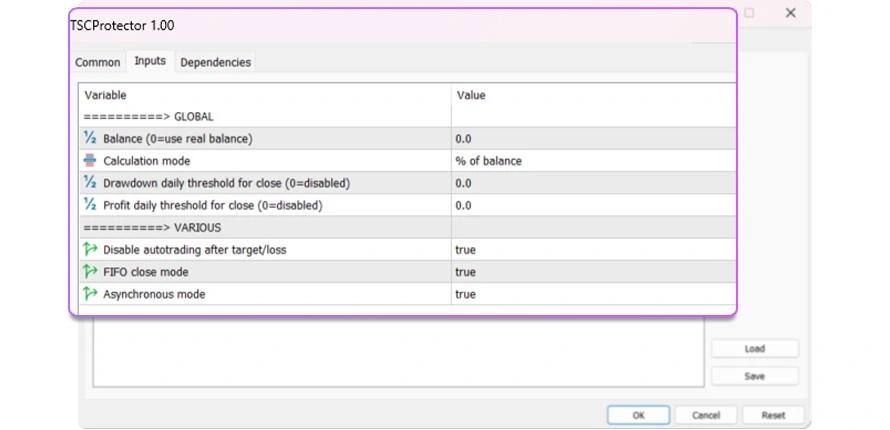
TSC Protector
The TSC Protector safeguards your trading account by automatically managing daily risk and profit targets. Set customizable drawdown and profit limits—either as a percentage or fixed money amount—once reached, it closes all open trades and optionally disables further trading for the day. It also includes FIFO Close Mode, which ensures your oldest trades are closed first and maintains compliance with prop firm rules.
Get the power of AI automation working for you today. Choose a plan that fits your trading style and budget. 🚀 Start now and experience stress-free, hands-free trading.
Cookie Settings
We use cookies to enhance your experience, analyze site traffic and deliver personalized content. Read our Cookie Policy.

We are thrilled to announce that TSC Version 5.4 is LIVE NOW. Here are the amazing features you've asked for!